Introducing Snapshot Mode
When working with Astro in SSG mode, Content Island (Headless CMS) queries are resolved during the build process.
The HTML is generated, deployed, and from that point on everything is served statically. No API calls. No external dependencies. Maximum performance.
But when we move to SSR or ISR (Astro, Next.js, TanStack Start, Nuxt, or any modern framework), the story changes.
Now Content Island queries are executed while the application is running.
Is it fast? Absolutely.
Can we add caching? Of course.
But there was one question I couldn't stop thinking about:
👉 What if we could keep the flexibility of SSR while getting the performance of a static site?
That's exactly why we built Snapshot Mode.
What does it do?
The idea is simple.
First, export a snapshot of your Content Island project as a JSON file.
npx content-island export --access-token <your-read-token>Remember that before you can run this command, you need to install the Content Island API client package with
npm i @content-island/api-client, or run it directly withnpx @content-island/api-client export --access-token <your-read-token>.
The snapshot contains your project's structure and textual content. Media assets continue to be served from the CDN as usual.
Next, enable Snapshot Mode where you create your Content Island client:
export const contentIslandClient = createClient({
  accessToken: ENV.CONTENT_ISLAND_TOKEN,
+  mode: 'snapshot',
});
And that's it.
Literally.
From that point on, the snapshot is loaded into memory and all queries are resolved locally, without making requests to the Content Island API.
The best HTTP request is always the one you don't have to make. 😎
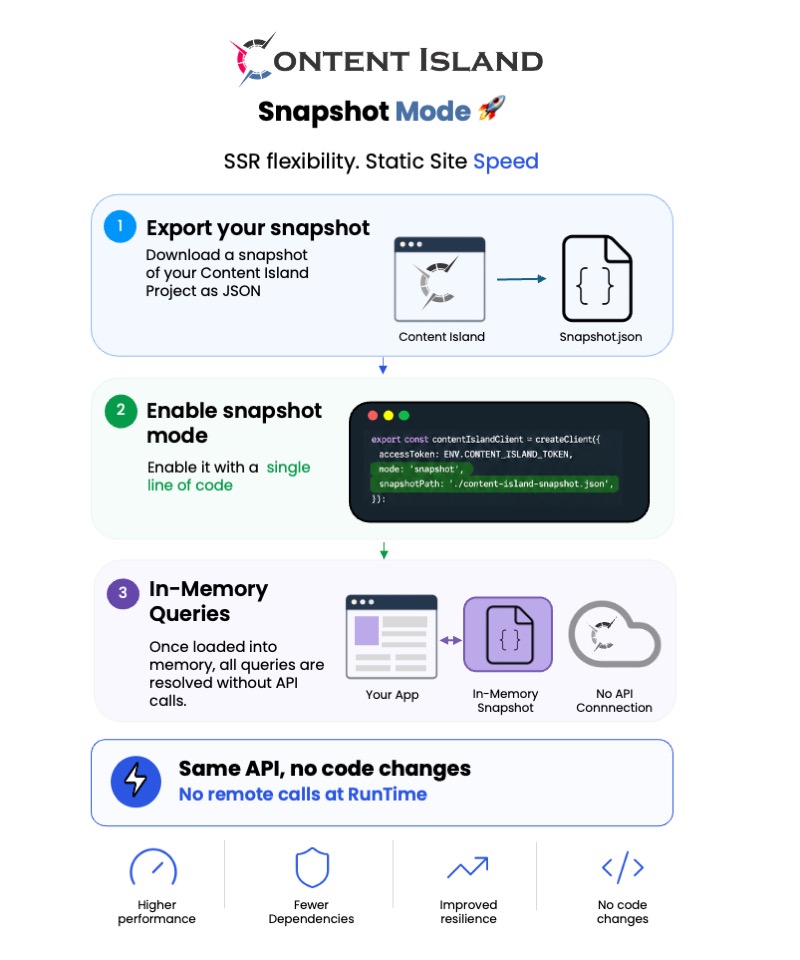
How difficult is it to enable?
One line.
If you already have an application running with Content Island, the change usually comes down to specifying the mode and the path to the snapshot.
How does this work in production?
Generate the snapshot during your deployment pipeline and deploy it together with your application.
- name: Export Content Island snapshot
  run: npx content-island export --access-token ${{ secrets.CONTENT_ISLAND_TOKEN }}

- name: Build
  run: npm run build

- name: Deploy
  run: npm run deploy
You can even control the execution mode through environment variables, allowing each environment to decide whether to use the API or a snapshot.
What happens when I publish new content?
That's covered too.
Content Island webhooks can automatically trigger your CI/CD pipeline:
The workflow looks something like this:
📝 Publish content ⚡ Trigger a webhook 📦 Generate a new snapshot 🚀 Deploy automatically
And that's it.
Can I mix API and Snapshot modes?
Yes.
In fact, it's one of the most interesting parts.
You can keep your application running normally against the API and decide, query by query, what you want to resolve from the snapshot and what you want to resolve in real time.
For example, you can override the execution mode on a per-query basis:
await contentIslandClient.getContentList({
  id: { in: contentIslandIds },
  mode: "snapshot",
});
Or the other way around:
await contentIslandClient.getContentList({
  id: { in: contentIslandIds },
  mode: "api",
});
How do I edit content?
Exactly the same way you always have.
You can keep using the Content Island visual interface so non-technical users can manage content.
Or, if you prefer to automate processes, use the Content Island MCP together with a write token.
When you have your changes ready, just generate a new snapshot and redeploy.
What if I want to test changes before publishing?
You can.
Working in PREVIEW mode, you can include draft content inside the snapshot to validate changes before publishing them.
Who is this for?
Mainly for SSR applications where:
✅ Content changes little relative to the traffic received.
✅ You want to reduce external dependencies.
✅ You want to squeeze out maximum performance.
✅ You like the idea of your application staying up even if the content API is temporarily unavailable.
In short:
👉 You keep the editing experience of a Headless CMS.
👉 You keep the flexibility of SSR.
👉 But queries are resolved locally from memory.
And you can feel the difference.
🎥 I'll be publishing a video soon showing how it works internally, real-world use cases, and some performance metrics.